
Background Texture

Products · LMS

Master Skills
with Smart
Learning.

One platform to teach, test and track — courses, proctored test series, coding practice and analytics for colleges, training companies and corporate L&D.

Learners working through courses on laptops

One Platform

A multi-organization learning and assessment platform. Admins build courses, schedule proctored test series with MCQ and live coding questions, assign coding practice, and track every learner with role-based analytics, leaderboards and downloadable report cards — all from one place.

0Roles, each with its own dashboard
0Question types, including live coding
0Programming languages auto-graded
0Levels of tenancy: org → department → group
Built for

Anyone Who Teaches, Tests or Trains

From a single college to a multi-campus group or a company-wide academy.

Universities & colleges
Training & placement cells
EdTech & training providers
Corporate hiring teams
Corporate upskilling & L&D
Universities & colleges
Training & placement cells
EdTech & training providers
Corporate hiring teams
Corporate upskilling & L&D
Universities & colleges
Training & placement cells
EdTech & training providers
Corporate hiring teams
Corporate upskilling & L&D
Universities & colleges
Training & placement cells
EdTech & training providers
Corporate hiring teams
Corporate upskilling & L&D
Universities & colleges
Training & placement cells
EdTech & training providers
Corporate hiring teams
Corporate upskilling & L&D
Universities & colleges
Training & placement cells
EdTech & training providers
Corporate hiring teams
Corporate upskilling & L&D
Corporate hiring teams
EdTech & training providers
Training & placement cells
Universities & colleges
Corporate upskilling & L&D
Corporate hiring teams
EdTech & training providers
Training & placement cells
Universities & colleges
Corporate upskilling & L&D
Corporate hiring teams
EdTech & training providers
Training & placement cells
Universities & colleges
Corporate upskilling & L&D
Corporate hiring teams
EdTech & training providers
Training & placement cells
Universities & colleges
Corporate upskilling & L&D
Corporate hiring teams
EdTech & training providers
Training & placement cells
Universities & colleges
Corporate upskilling & L&D
Corporate hiring teams
EdTech & training providers
Training & placement cells
Universities & colleges
Highlights

Teach. Test. Track. In One Place.

Everything a learning and assessment programme needs — without stitching tools together.

01

Teach.

Build and deliver courses

  • Course Builder

    Chapters, lectures, video, notes, resources, quizzes and in-lesson coding exercises.

  • AI-Assisted Authoring

    Generate course outlines and content, plus captions and chapter markers from lecture video.

  • Certificates

    Branded course-completion certificates carrying the organization’s logo.

  • Scheduling & Notifications

    Schedule classes and tests by org, department or group, with in-app and email alerts.

02

Test.

Assess skills fairly

  • Proctored Test Series

    Fullscreen lock, tab-switch detection, copy/paste blocking and auto-submit on violations or time-out.

  • Seven Question Types

    MCQ, multi-select, true/false, fill in the blanks, match the following, essay and coding.

  • Real Code Execution

    Write and run Python, Java, C++, C and JavaScript — auto-graded against test cases.

  • Leaderboards Everywhere

    Per series, test, course, chapter quiz, assignment and coding problem.

03

Track.

Measure and manage at scale

  • Analytics at Every Level

    Platform, organization, department, group, course, test, assignment, coding and engagement.

  • Reports That Ship

    Excel results, PDF analytics and per-student PDF report cards.

  • Multi-Tenant by Design

    Organizations → departments → groups, each with its own learners, content and reports.

  • Bulk Operations

    CSV/Excel import of users, groups, questions and coding problems; bulk assignment.

Five roles

A Dashboard for Everyone

01

Super Admin

The platform owner. Manages every organization, user, course, test series, coding problem and assignment; sees platform-wide analytics and configures email domains, maintenance mode and backups.

Role dashboard
02

Organization Admin

Admin of one college or company. Runs their departments, groups, learners and educators; creates and assigns courses, runs test reports, grants re-attempts and sees org-level analytics.

Role dashboard
03

Operation Admin

Regional or operations manager. Works across several assigned organizations — creates courses, test series, assignments and coding problems; monitors analytics and leaderboards for all of them.

Role dashboard
04

Educator

Trainer or faculty member. Builds tests and coding problems, manages assignments and schedules, and tracks learner progress for their courses and groups.

Role dashboard
05

Learner

Student or trainee. Takes courses, quizzes, test series, assignments and coding practice; sees personal analytics and leaderboards and earns certificates.

Role dashboard
Courses

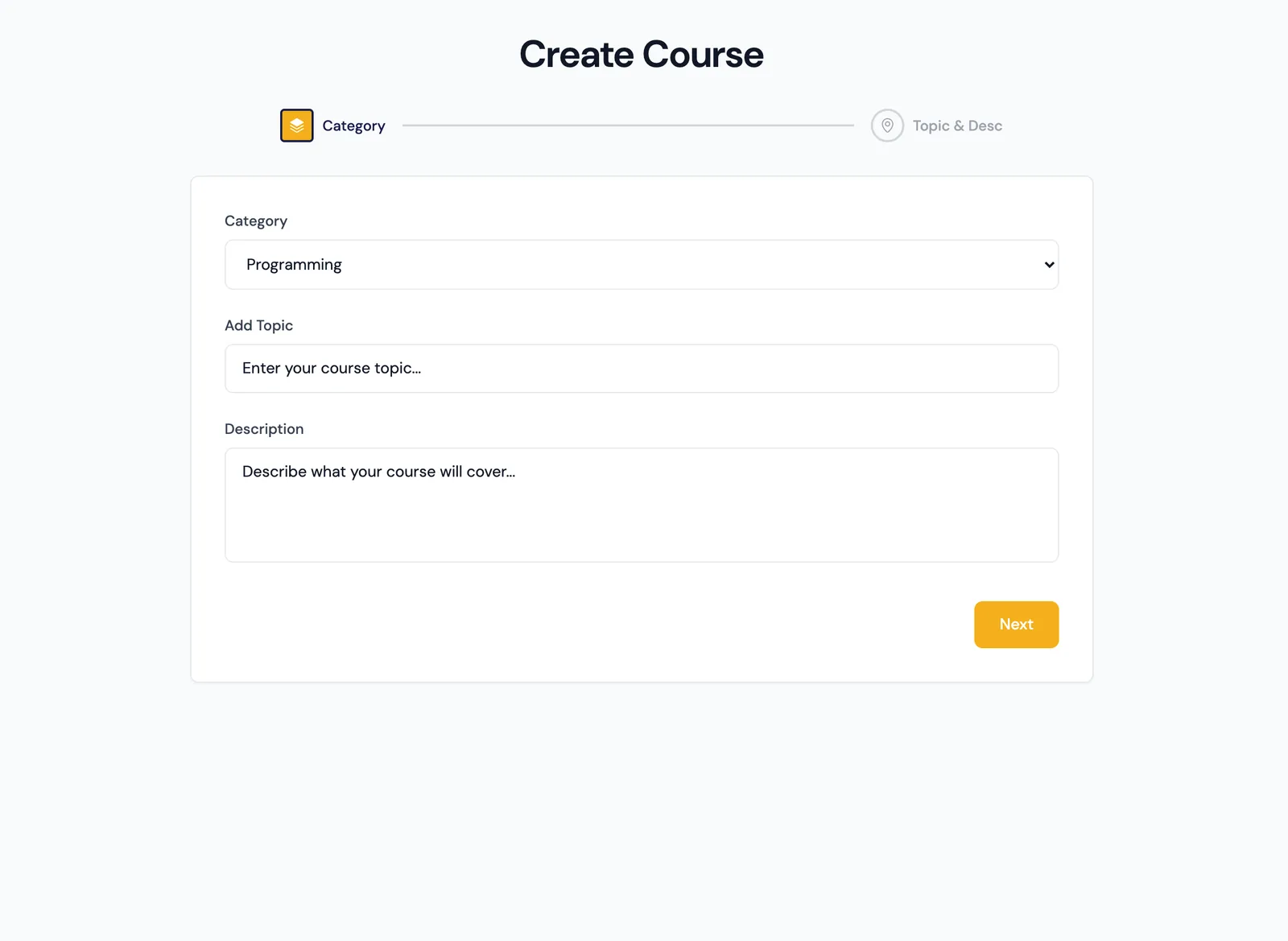
Build Courses in Minutes — With AI

Describe a topic and the platform drafts the course structure and content. Then refine chapters, lectures and sub-lectures in the course builder.

  • Rich text, uploaded or YouTube video, PDFs, attachments and resources
  • Public or private, publish/unpublish, categories, prerequisites and tags
  • Assign to organizations, departments, groups or individual learners
  • AI-generated captions and chapter markers from lecture video
FixityTech LMS
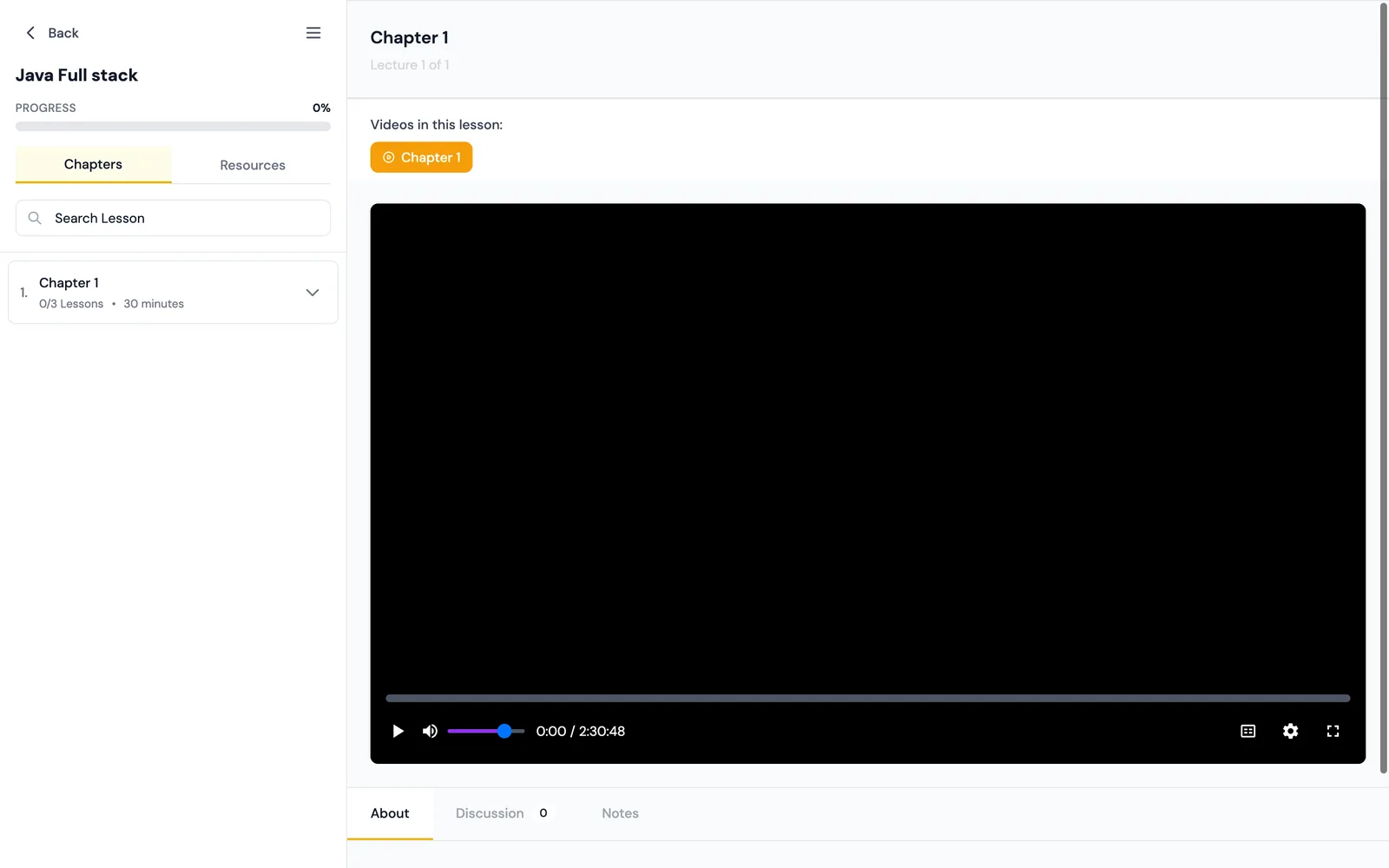
AI course creator — pick a category, describe a topic, get a drafted course.Learner course player — chapters, progress, video, resources, discussion and notes.
Assessments & proctoring

Proctored Test Series, Built In

Organise tests into sections with start/end windows, duration and maximum attempts — then run them in a browser-proctored exam environment.

  • Enforced fullscreen and tab-switch detection — the third switch auto-submits
  • Copy, paste and right-click blocked; every attempt logged as a violation
  • Question bank with rich text, CSV/Excel import and cloning
  • Draft → Scheduled → Active → Completed → Archived lifecycle with reminder emails
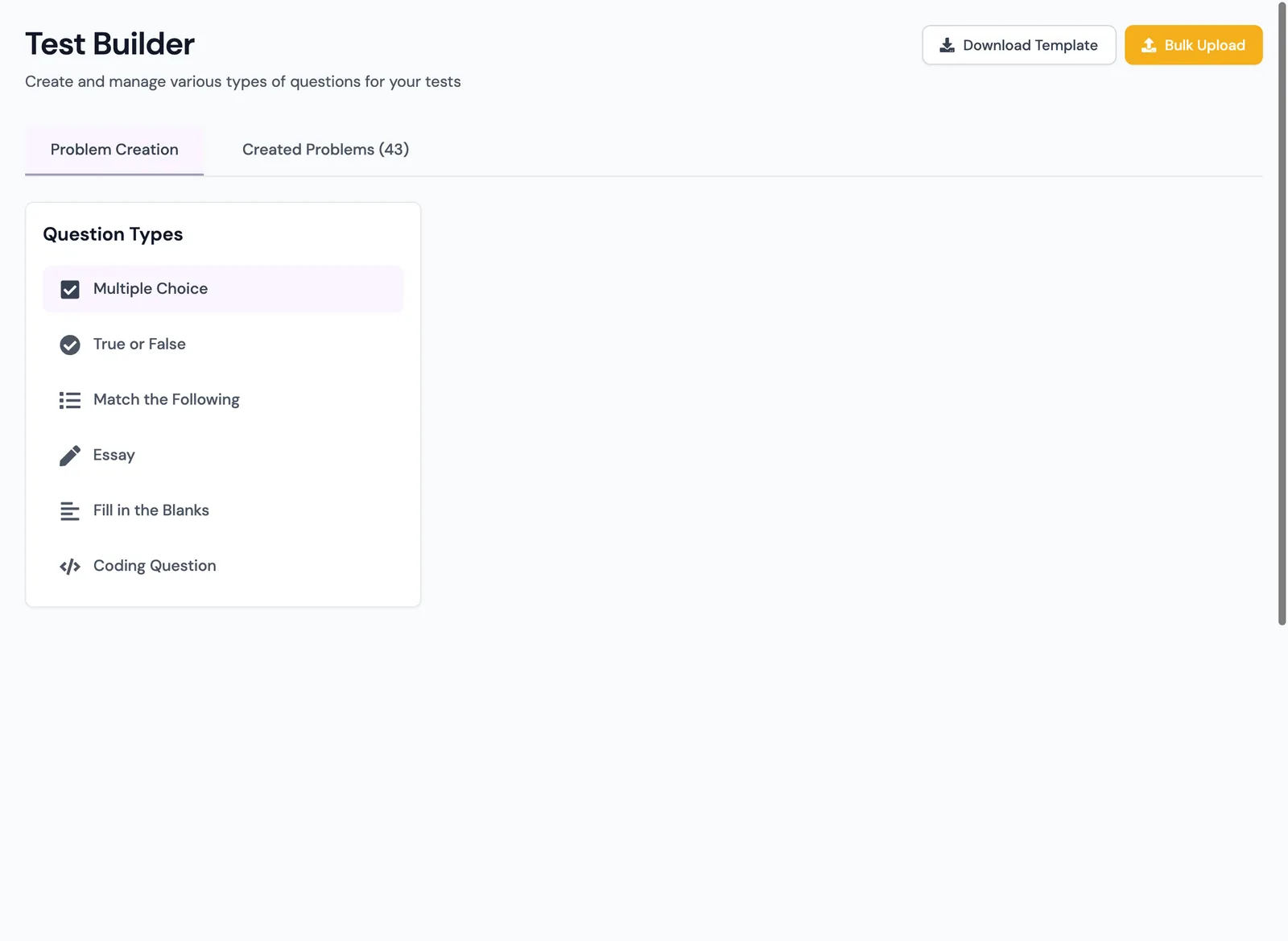
Multiple choiceMulti-selectTrue / falseFill in the blanksMatch the followingEssay / short answerCoding
FixityTech LMS
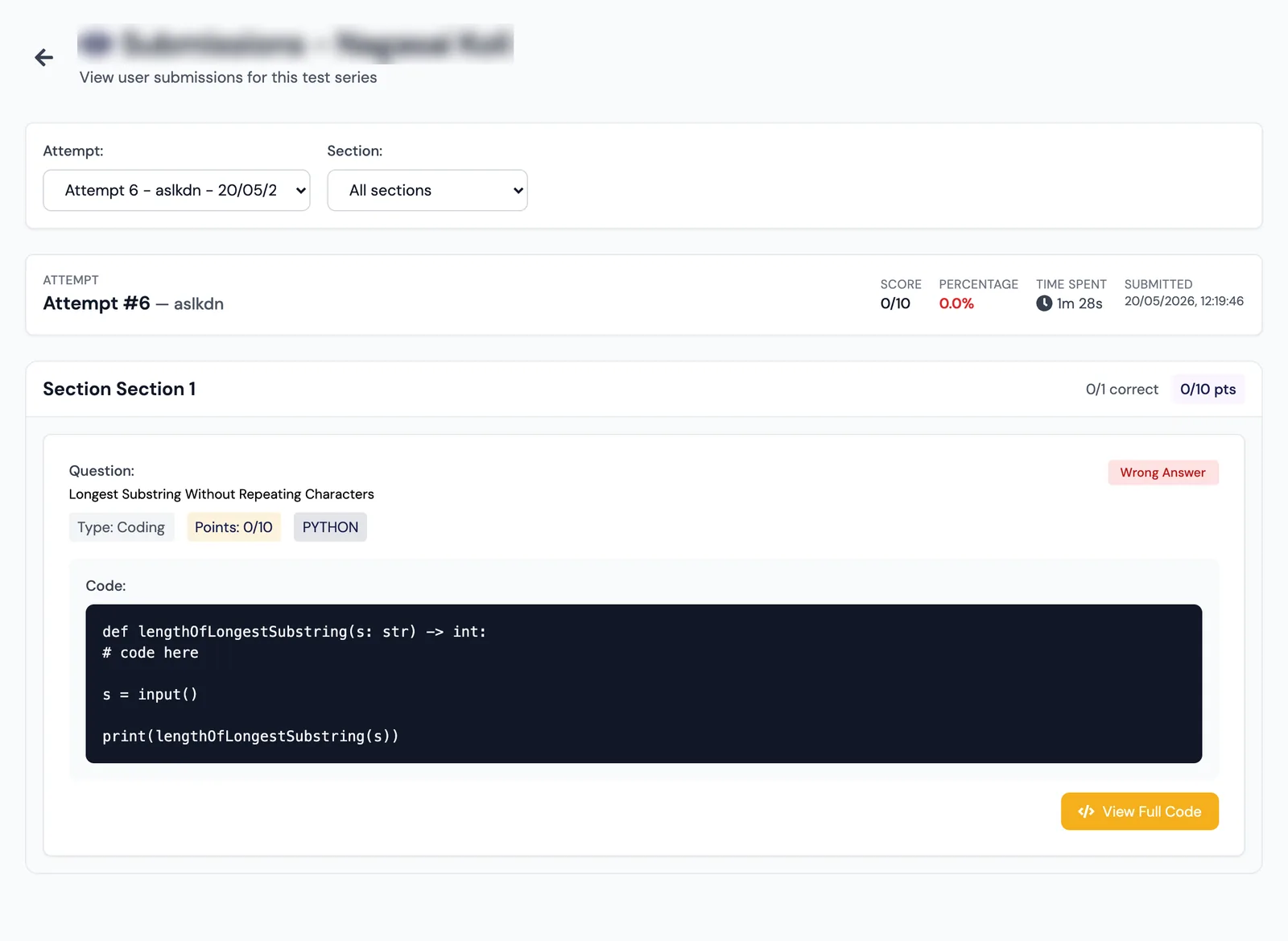
Question builder — seven question types with rich text and bulk upload.Submission review — question-by-question, including the learner’s submitted code.
Learn by coding

Real Code, Run and Graded in the Browser

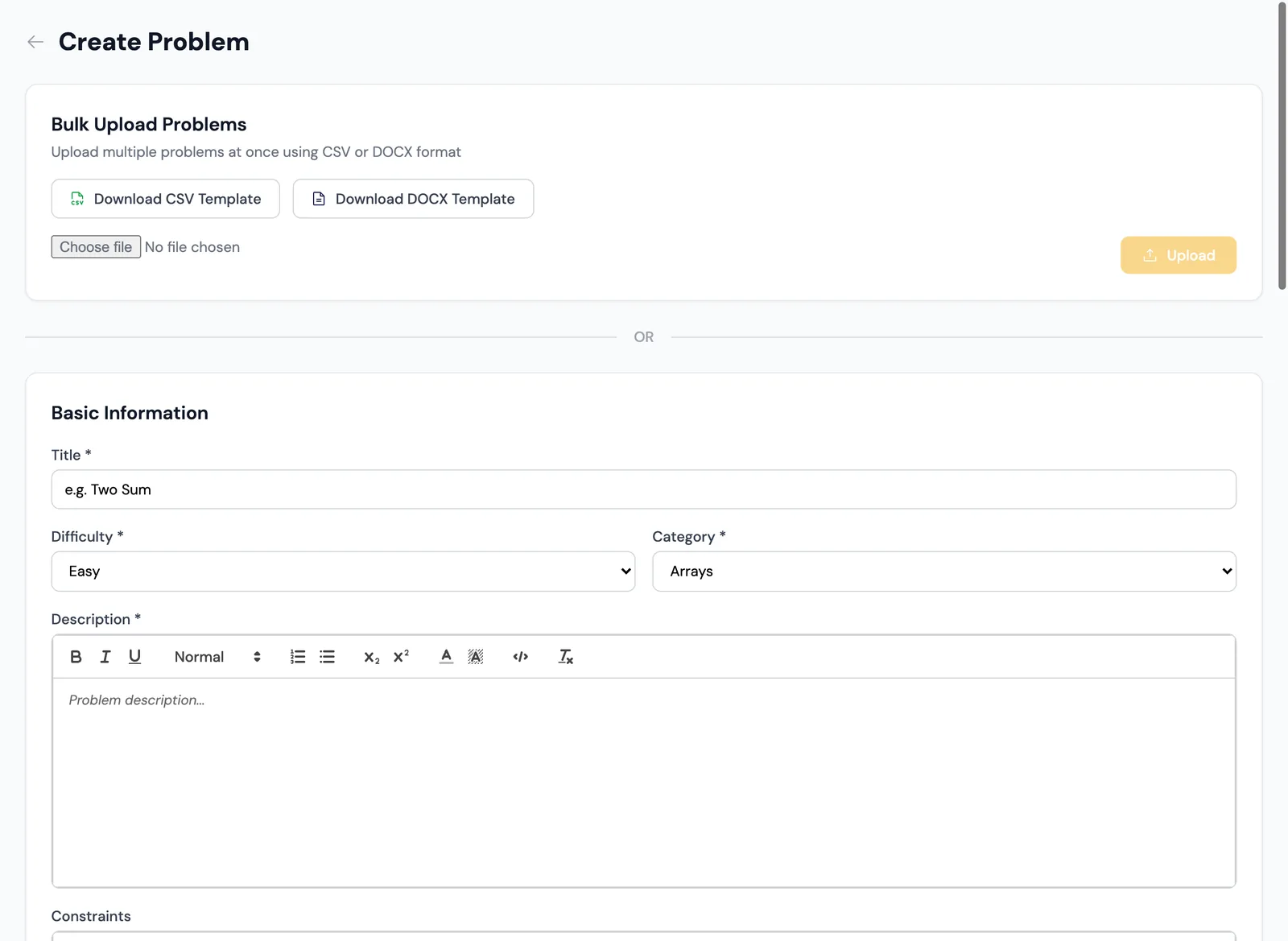
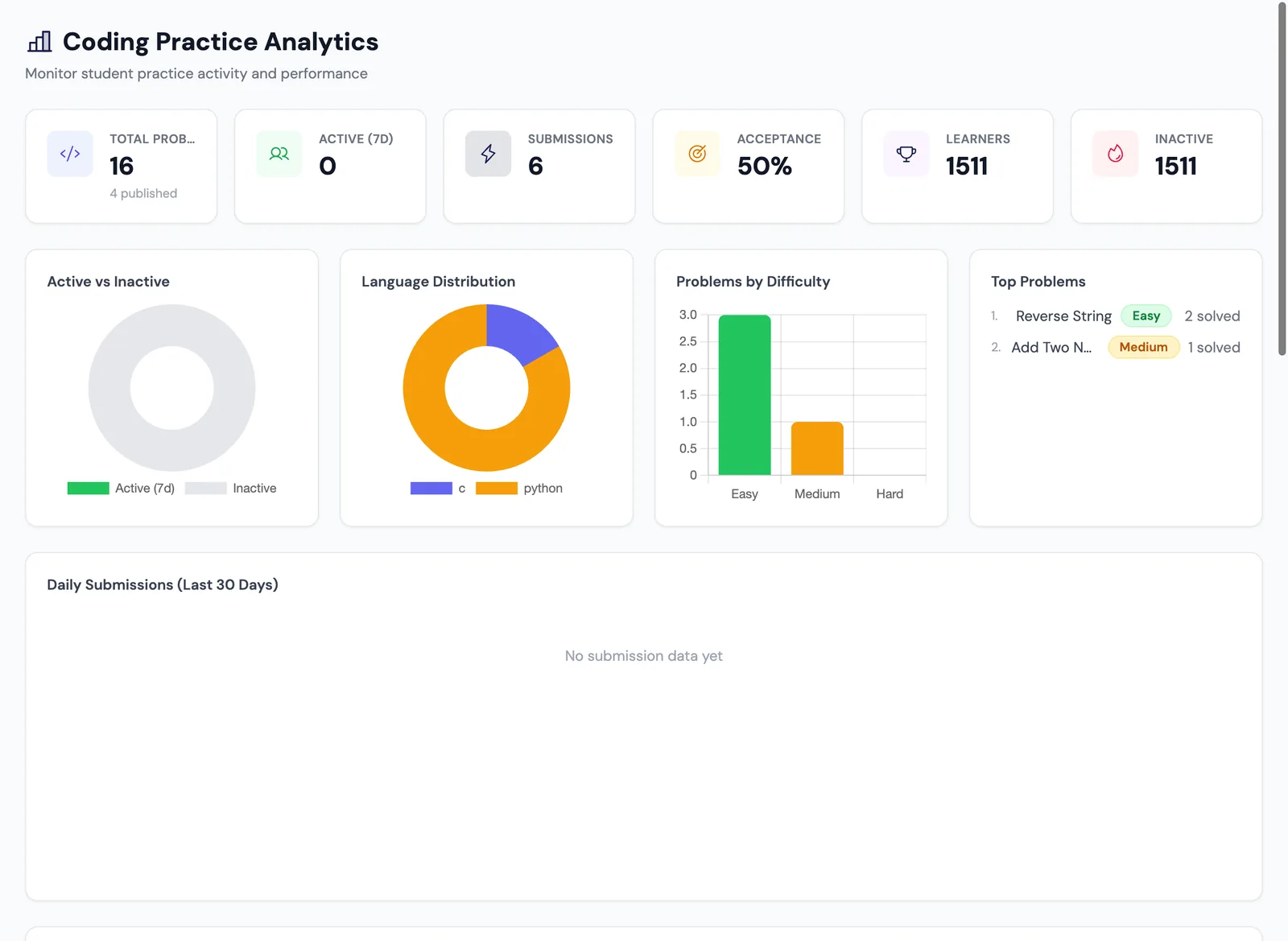
A practice library of Easy, Medium and Hard problems. Learners run code against sample cases and submit against hidden test cases in a sandboxed execution service.

  • Create problems one by one or bulk upload from CSV or DOCX templates
  • Per-problem leaderboards plus personal progress and activity history
  • Time and memory reported for every run
  • Reusable problem sets and timed assignments with their own reports
Python 3Java 17C++17CJavaScript
FixityTech LMS
Create a coding problem — difficulty, category, description and constraints.Coding analytics — submissions, acceptance rate, language mix and difficulty.
Analytics & reports

From the Whole Platform to One Learner

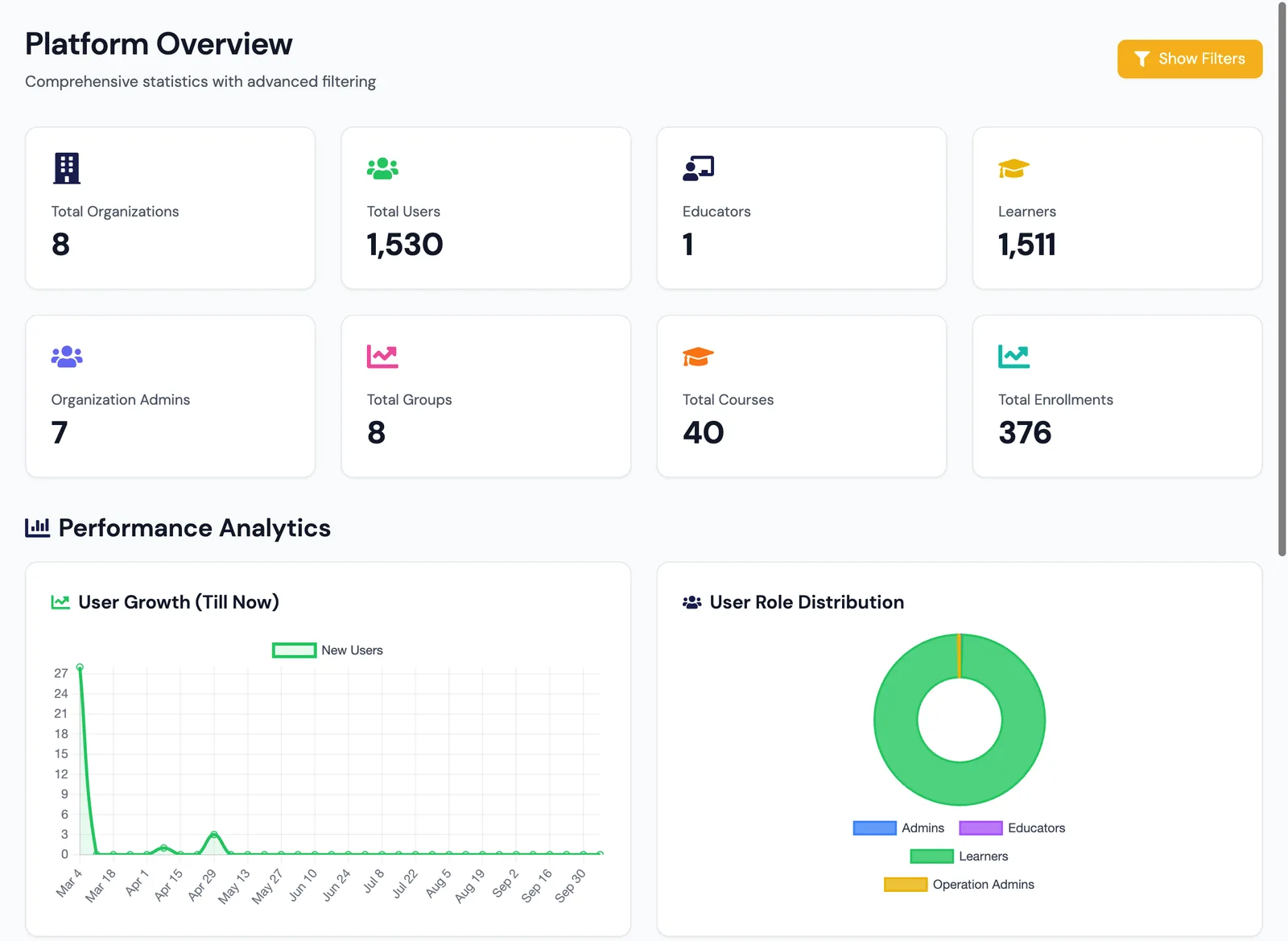
Role-scoped dashboards drill down from platform to organization, department, group and individual learner — and every report can leave the platform.

  • Excel export: summary sheet, one sheet per test and every attempt
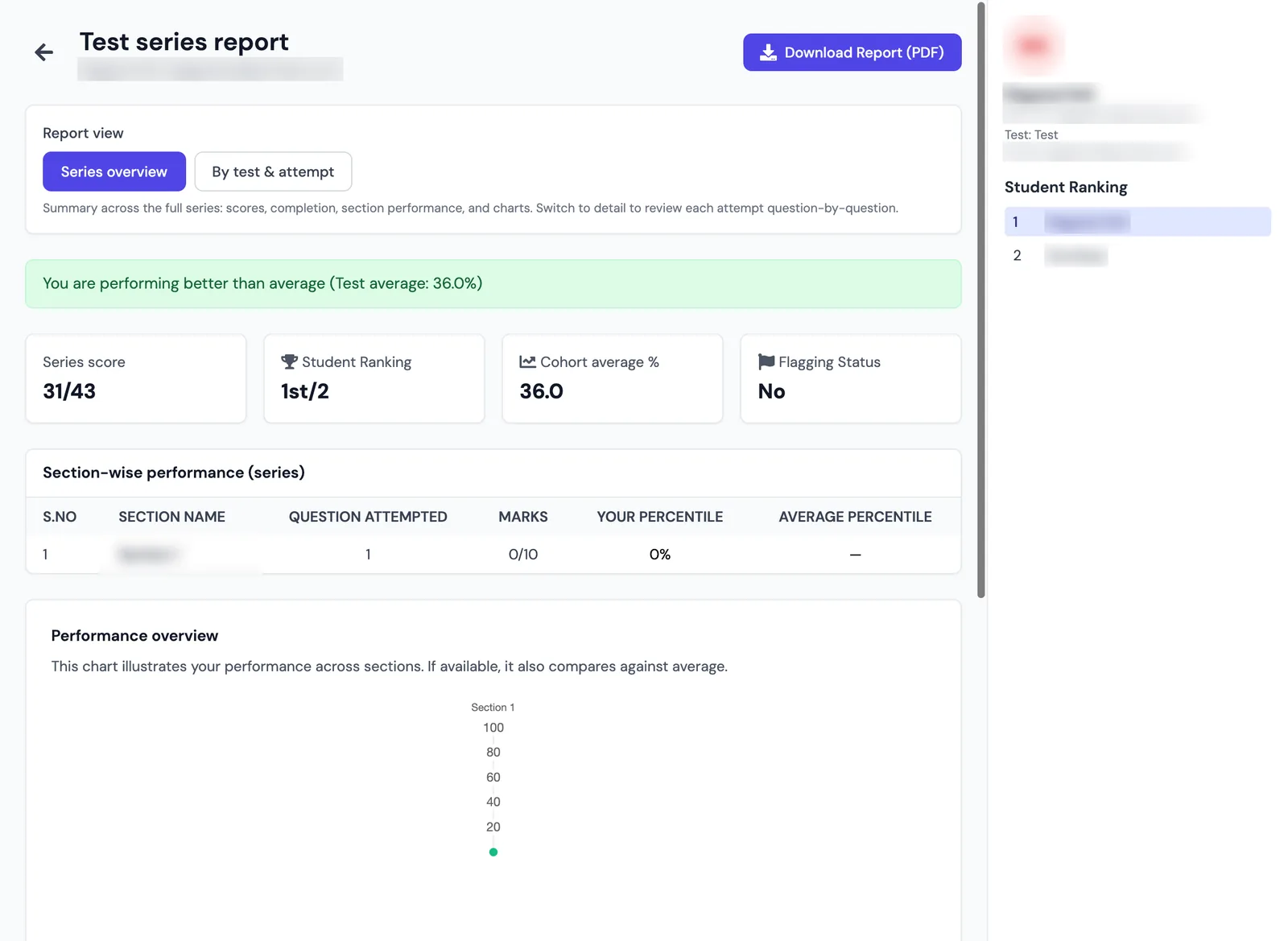
  • Per-student PDF report cards with rank, cohort average and section-wise marks
  • Department-wise analytics PDF for management reviews
  • Targeted re-attempts — the new score replaces the old on submit
FixityTech LMS
Platform overview — KPI tiles, user growth and role distribution.Student report card — score, rank, cohort average and section-wise performance.
Built for institutions

Many Organizations. One Platform.

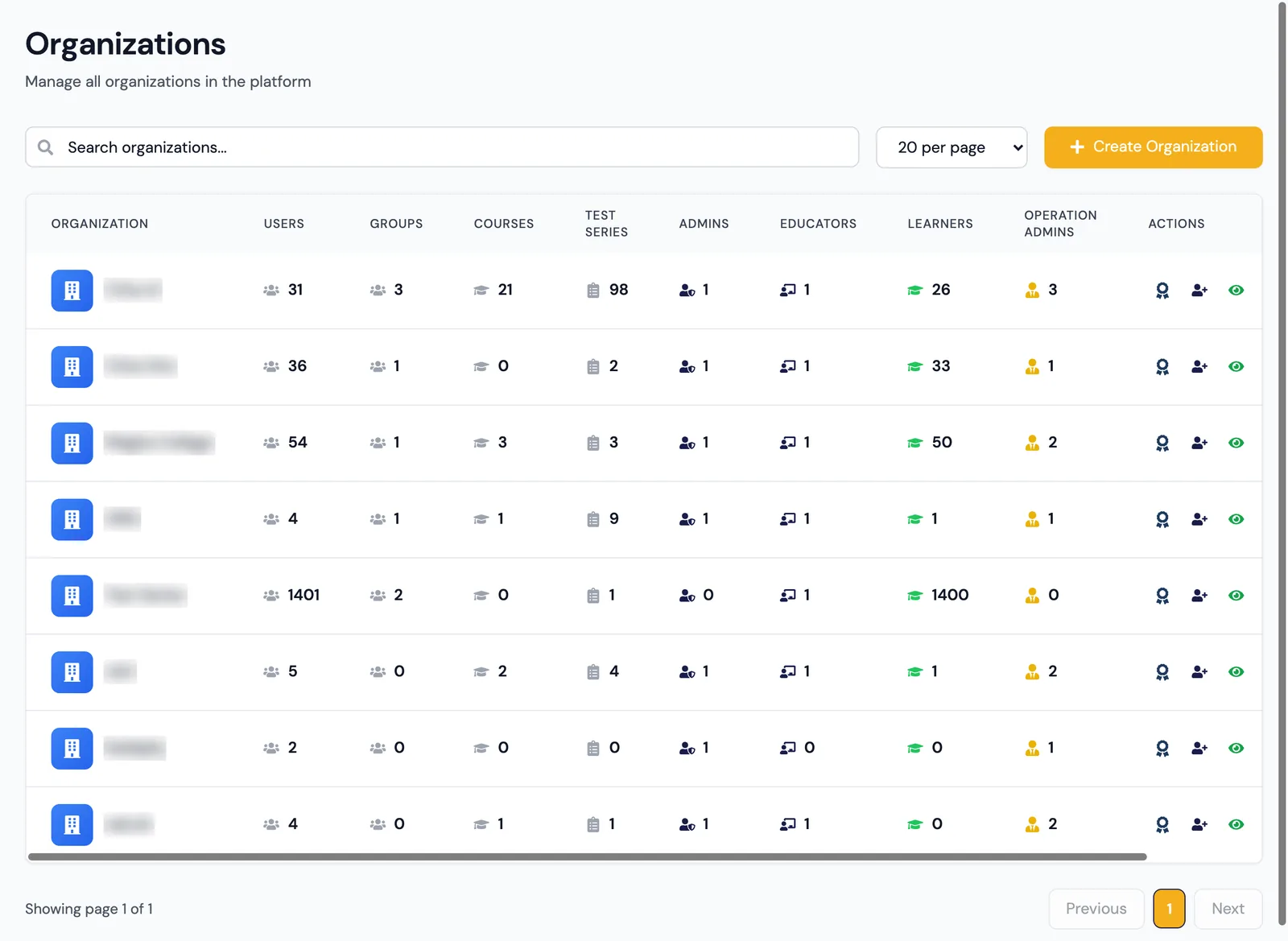
Organizations, departments and groups keep data cleanly separated — with per-organization signup links, email sender identity and certificate logos.

  • Organization → department → group (batch), with graduation-year tagging
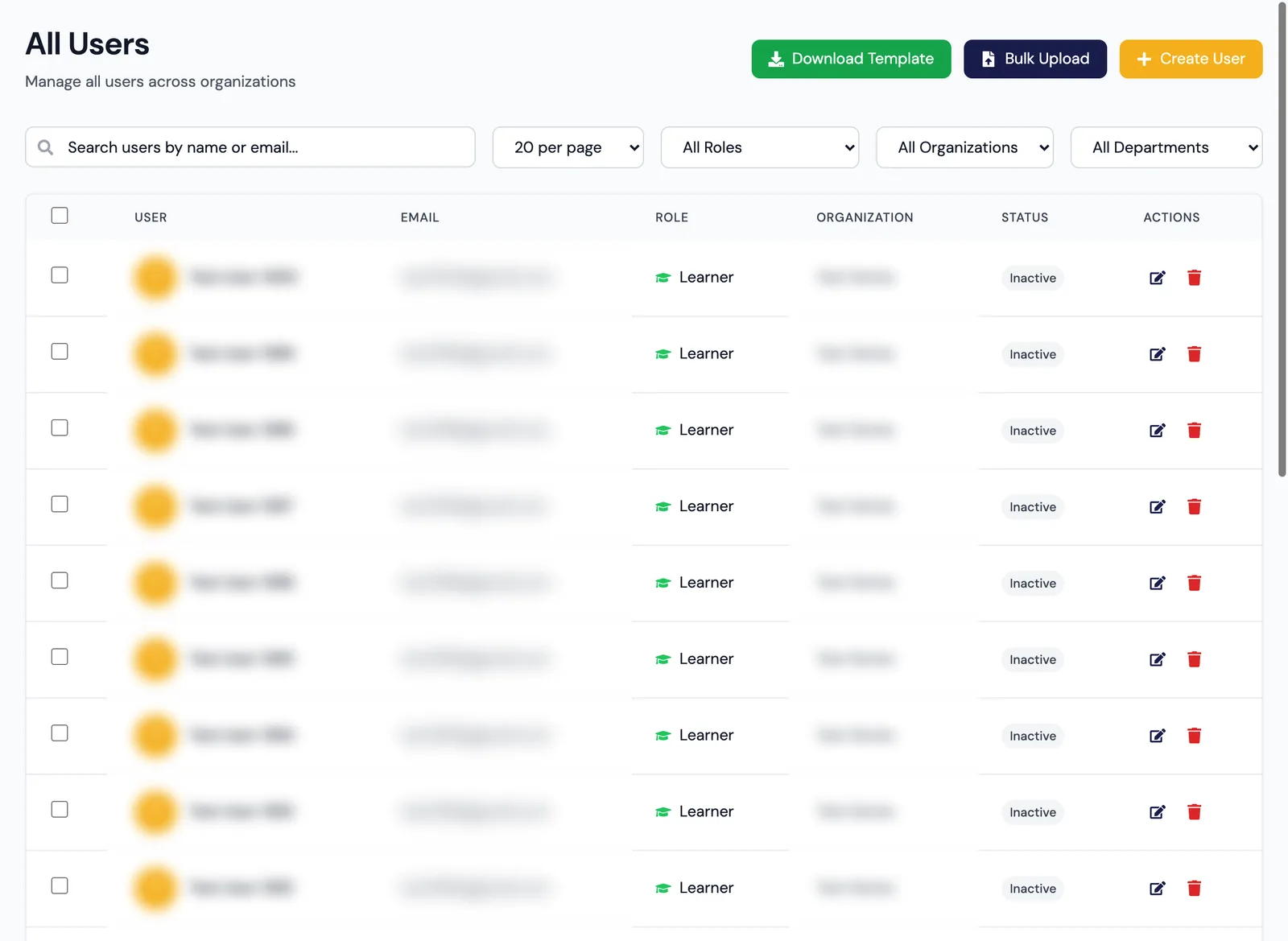
  • Bulk CSV upload and bulk update of users; bulk-assign to groups
  • Clone courses and test series into other organizations without touching the original
  • One active session per account
FixityTech LMS
Organizations — users, groups, courses, test series and role counts per organization.All users — role and status filters, CSV template, bulk upload and create user.
Scheduling, notifications & certificates

Every Class and Test, On Schedule

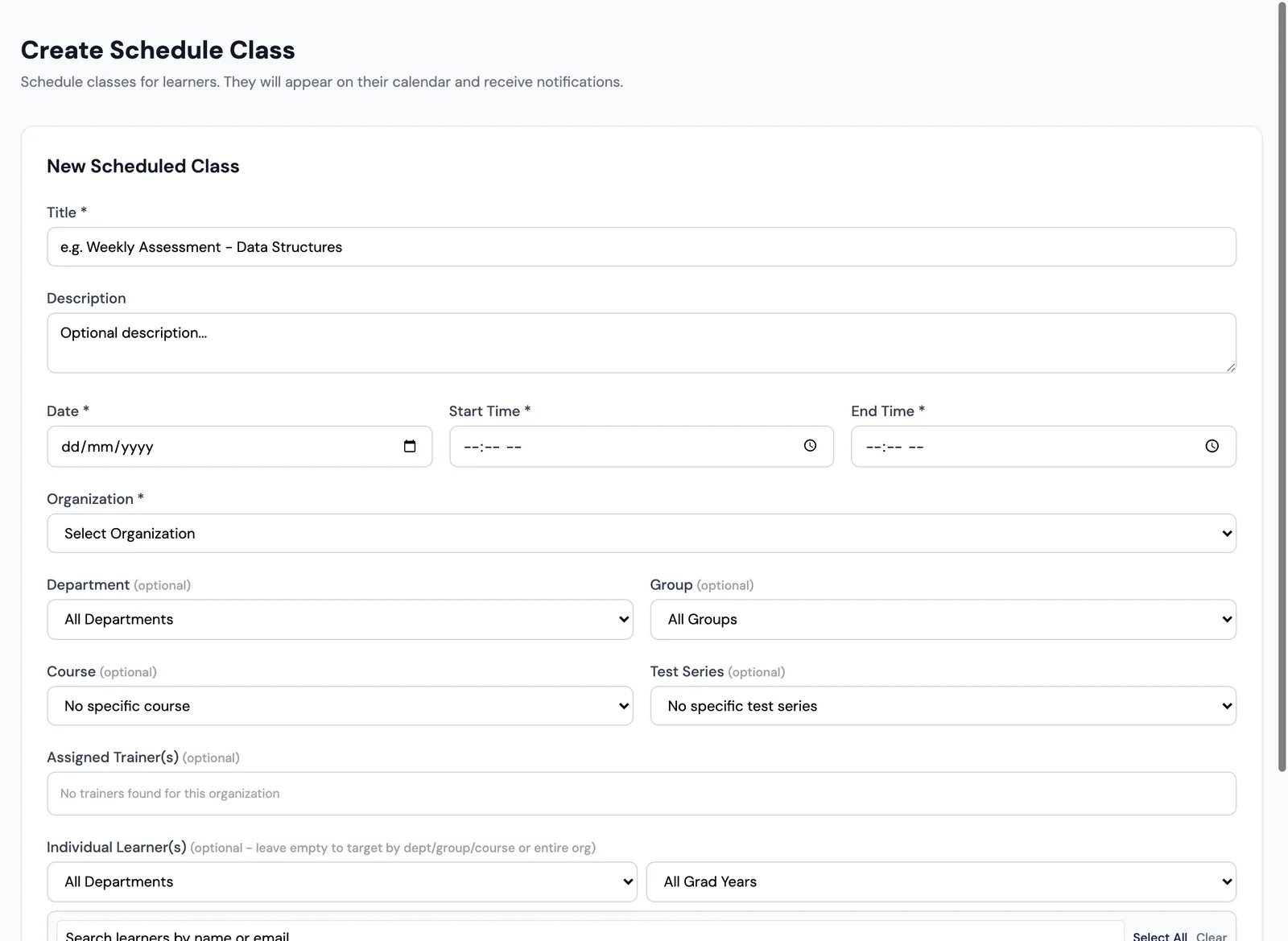
Schedule classes or tests for an organization, department, group, course, test series or specific learners — and assign trainers.

  • In-app notification bell and email for every learner
  • Email templates for assignments, reminders, completion, certificates and password reset
  • Course-completion certificates as PDF with the organization’s logo
  • Preview certificate design per organization
FixityTech LMS
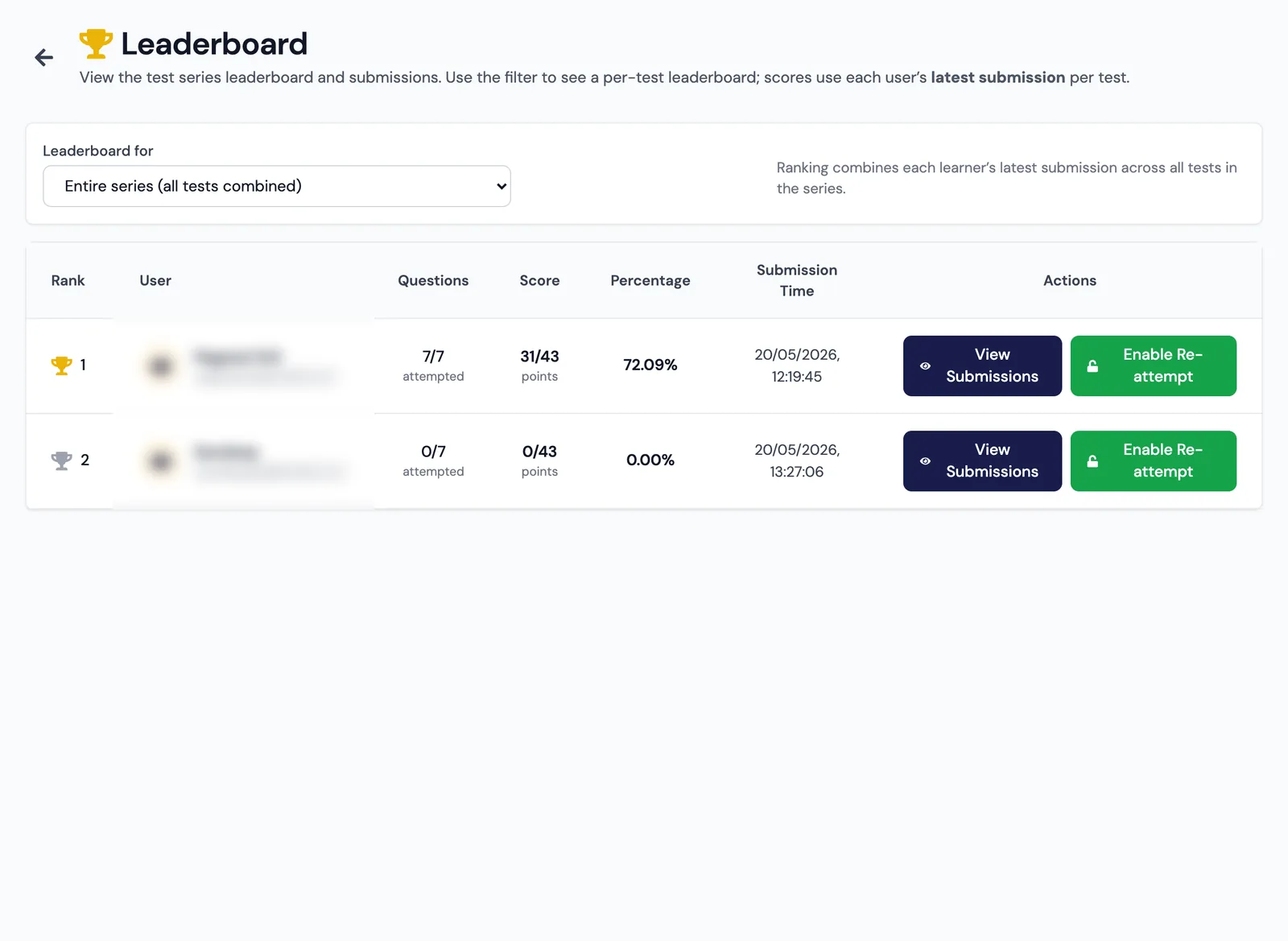
Schedule a class — target by organization, department, group, course or learners.Leaderboards — whole series or one test, with one-click submission review.
Under the hood

Cloud-Native. Secure. Ready to Scale.

A modern stack on AWS, with sandboxed code execution and AI built in.

Web App

React + Vite, Tailwind CSS, Monaco code editor, Chart.js

API

Node.js, Express, Prisma ORM

Database

PostgreSQL

Code Execution

Sandboxed service — Python 3, Java 17, GCC (C / C++17), Node.js

AI

Google Gemini 2.5 Flash

Media & Email

AWS S3 / Cloudinary; AWS SES / SMTP with per-org sender domains

Hosting

AWS ECS Fargate (Docker), ECR, Application Load Balancer

CI/CD

GitHub Actions — automatic deploys of changed services

Auth

Email + password (bcrypt) and Google sign-in; JWT with single-active-session control

Cloud (AWS), multi-tenantBrowser proctoringSingle active sessionPer-org email domainsScheduled database backupsMaintenance mode

Skill Matters.

See the platform with your own courses and tests.

Book a Demo